Open protocol · No network · Web, iPhone, Android, desktop
Turn files into
moving light
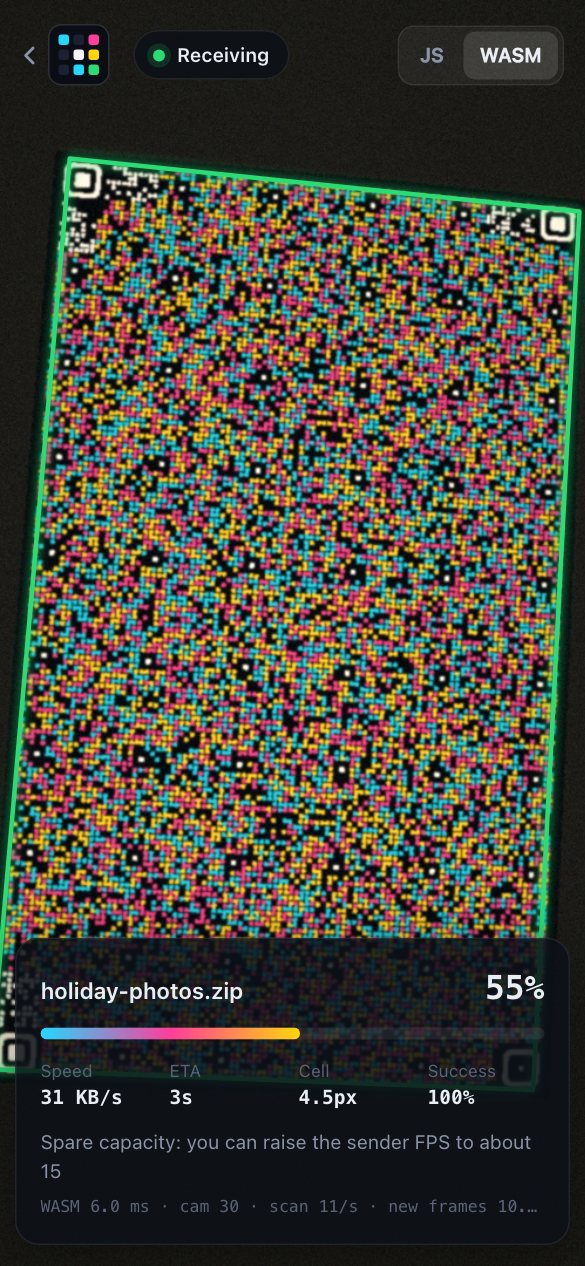
The sender plays your file as an animated colour code; the receiver films it and rebuilds the file. No network, Bluetooth, pairing or account is needed.
Free in the browser. Apps for iPhone and Android: US$2.99, coming soon.
Photosensitivity warning: while sending, the code flashes up to 60 times a second. If flashing light affects you (e.g. photosensitive epilepsy), don’t look at it.
- No network
- No pairing, no account
- Files never touch a server
- Protocol 1.0, frozen
- MIT licence
How it works
Data goes one way, from screen to camera, so the receiver can start at any time and can miss frames.
- holiday-photos.zipyour file
- Fountain codea stream of new packets
- Colour frames12–60 a second
- Cameraany order, any gaps
- holiday-photos.zipchecked, byte for byte
- 1
Open Send
On the device that has the file, choose the file or type a message. The screen plays the code, sized for that screen.
- 2
Point a camera
Open Receive on the other device and point its camera at the screen. Three of the four corners are enough.
- 3
Hold steady
Every frame carries new data, so a missed or blurred frame only makes the transfer a little slower.
- 4
Save
The receiver checks the whole file and opens it: text and images in a reader, any other file to save or open.
More data in every frame
Lumen Code is used like an animated QR code, but each frame carries more data:
| Animated QR (v25) | Lumen Code 1.0 | |
|---|---|---|
| Bits per cell | 1 | 2 (4 colours) or 3 (8 colours) |
| Shape | square | fills the screen, either orientation |
| Data per frame, phone screen | ~1.2 KB | ~2.2 KB / ~3.4 KB |
| Data per frame, 13″ laptop | ~1.2 KB | ~6.9 KB / ~10.3 KB |
| A missed frame | wait for it to come round | no need to wait: every frame is new |
| Glare on one corner | frame lost | read from the other three |
At 12 frames a second a laptop screen sends 80–125 KB/s of raw capacity. The fastest measured transfer, between two phones running the apps, reached 96 KB/s. What a receiver gets depends on its camera; the receiver shows the live numbers.
Made for real cameras
It works with handheld phones, glare, ordinary lenses and small screens.
-
Adaptive density
The cell size follows the physical size of the screen: a small phone still reads reliably, a laptop carries several times more.
-
Fountain code
Every frame is new data. Frames can be missed, blurred or out of order; once enough have arrived, the file is complete.
-
Three corners are enough
Each corner has a finder pattern and an alignment grid covers the code, so a frame decodes even with one corner hidden by glare or a finger.
-
Colour and error correction
2 or 3 bits per cell, Reed–Solomon on every codeword, a checksum on every packet and on the whole file.
-
Two engines, identical frames
The JavaScript and Rust/WebAssembly implementations make bit-identical frames. Switch while receiving and nothing is lost.
-
Live dashboard
Shows speed, cell size, success and capture rate while you scan, and a hint when something limits the speed.
In the browser, or as an app
All versions use the same protocol, so a browser can send to a phone app and the other way round.
-
Web
Any modern browser with a camera
Nothing to install. Send and receive files and text, on phones and computers.
-
iPhone
iOS 17 or later
Reads the camera directly and switches it to 60–240 frames a second when the sender is fast; plays at 120 Hz, with haptics.
-
Android
Android 10 or later
Captures at up to 60 frames a second under the app’s own exposure control; scans less when the phone gets hot.
-
Desktop
macOS, Windows, Linux
Send from a big screen or receive with a webcam. Signed and notarized on macOS.
The apps are usually faster than the browser: they read the camera directly and use higher frame rates.
An open protocol, frozen at 1.0
The specification is public, so anyone can implement it.
Frozen
Version 1.0 is final and its wire format will not change, so every 1.0 receiver can read every 1.0 sender.
Two reference implementations
JavaScript and Rust pass the same conformance vectors and make identical decisions on tens of thousands of random and damaged inputs.
Add it to your app
There is no package to install: point your coding agent at the repository. The guides cover the web, Rust, and other languages through a C ABI.
Open source
The protocol, both implementations and all the apps, under the MIT License.
Free in the browser. US$2.99 for the apps.
The web version and the store apps send and receive the same files; the apps are usually faster.
Web
Free forever
- Any modern browser with a camera
- Nothing to install, no account
- Files and text, send and receive
Build it yourself
Free forever
- The complete source, under the MIT License
- iPhone, Android and desktop: the same apps as in the stores
- Desktop builds ready to download from GitHub Releases
App Store and Google Play
US$2.99 once
- Official signed apps for iPhone and Android
- Updates through the store
- No subscription, no in-app purchases, no ads, no account
- Pays for further development
One price worldwide; each store shows it in your currency. iPhone and Android are bought separately, as the two stores require.
Questions
If the browser version is free, why pay for an app?
You do not have to: the web version handles the same files, and you can build the apps yourself for free. The store apps read the camera directly, use higher frame rates and control exposure, so they are usually faster and run cooler. Buying one also pays for further development.
Does my file go through a server?
No. The page is loaded from the website once; the file goes only from the sending screen to the receiving camera. Nothing is uploaded.
How large can a file be?
Up to 256 MiB per transfer. In practice the speed sets the limit: at 50 KB/s, 1 MB takes about 20 seconds and 20 MB about 7 minutes.
What do I need?
Two devices: one with a screen, one with a camera. Phones, tablets and computers all work, in either role. In a browser the camera needs the HTTPS site (or localhost).
Does it work without the internet?
The apps need no connection at all. The web version needs one to load the page; the transfer itself never uses the network.
Is the flashing safe to look at?
While sending, the code changes colour up to 60 times a second. People who are sensitive to flashing light, for example with photosensitive epilepsy, should not look at it.
Can I use Lumen Code in my own app?
Yes. The protocol is open and frozen, and the code is MIT-licensed. Take src/core for the web, the Rust crate for native code, or the C ABI from other languages; the developer guides and the conformance vectors show how.
Why not AirDrop or a cable?
Use them when you can. Lumen Code is for when you cannot: devices from different makers, no shared network, a locked-down or air-gapped computer, or a screen you can only look at.
Try it with two devices you already have.
Open Send on one and Receive on the other. Nothing to install.